

Maildeno can render any template into three output formats. You choose the target at render time — no changes to the template are needed.
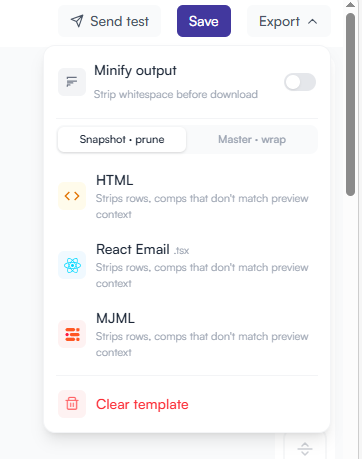
Multiple export formats on a single template design: HTML, React Email and MJML.
Render targets
| Target string | Format | Best for |
|---|---|---|
|
Plain HTML document |
Any transactional email provider — SendGrid, Postmark, Amazon SES, Resend, Mailgun, SparkPost, etc. |
|
React/JSX component ( |
Next.js or Node.js apps using the React Email framework. |
|
MJML source |
Teams maintaining an MJML toolchain or requiring advanced cross-client compatibility guarantees. |
Choosing a target
JavaScript
// HTML (default)
const html = await client.renderHtml("template-id")

// React Email
const tsx = await client.renderReact("template-id")

// MJML
const mjml = await client.renderMjml("template-id")

// Or use render() for full control
const result = await client.render({
  templateId: "template-id",
  target: "react-email",
  dynamicData: { ... },
})
console.log(result.output)
console.log(result.target)      // "react-email"
console.log(result.templateId)  // "550e8400-..."

`"html" | "react-email" | "mjml"`
Python
# HTML (default)
html = client.render_html("template-id")

# React Email
tsx = client.render_react("template-id")

# MJML
mjml = client.render_mjml("template-id")

# Or render() for full control
result = client.render(
    template_id="template-id",
    target="react-email",
    dynamic_data={ ... },
)
print(result.output)
print(result.target)       # "react-email"
print(result.template_id)  # "550e8400-..."

`"html"`, `"react-email"`, or `"mjml"`
API key scopes and targets
Each API key can be restricted to specific targets. Requesting a target outside the key’s scope returns a 403 FORBIDDEN error.
# Create a key scoped to HTML only
POST https://api.maildeno.com/v1/keys
{ "name": "Production HTML key", "targets": ["html"] }
See API Keys for full details.
Piping output to an email provider
SendGrid (HTML)
import sgMail from "@sendgrid/mail"
import { MaildenoClient } from "maildeno"

const maildeno = new MaildenoClient({ apiKey: process.env.MAILDENO_API_KEY! })
sgMail.setApiKey(process.env.SENDGRID_API_KEY!)

const html = await maildeno.renderHtml("template-id", {
  merge_tags: { text: { name: "Noruwa" } },
})

await sgMail.send({
  to: "noruwa@example.com",
  from: "hello@maildeno.com",
  subject: "Welcome to Maildeno",
  html,
})
Amazon SES (HTML)
import boto3
import os
from maildeno import MaildenoClient

maildeno = MaildenoClient(api_key=os.environ["MAILDENO_API_KEY"])
ses = boto3.client("ses", region_name="us-east-1")

html = maildeno.render_html("template-id", {
    "merge_tags": {"text": {"name": "Noruwa"}},
})

ses.send_email(
    Source="hello@maildeno.com",
    Destination={"ToAddresses": ["noruwa@example.com"]},
    Message={
        "Subject": {"Data": "Welcome to Maildeno"},
        "Body": {"Html": {"Data": html}},
    },
)